
1. နိဒါန်း
This manual provides essential information for the safe and efficient operation of your PowMr 4000W Hybrid Solar Inverter. This device is designed to convert 24VDC battery power into 110/120VAC pure sine wave electricity, integrating a 140A MPPT charge controller for optimal solar energy utilization. It supports various battery types and off-grid system configurations. Please read this manual thoroughly before installation and use, and retain it for future reference.
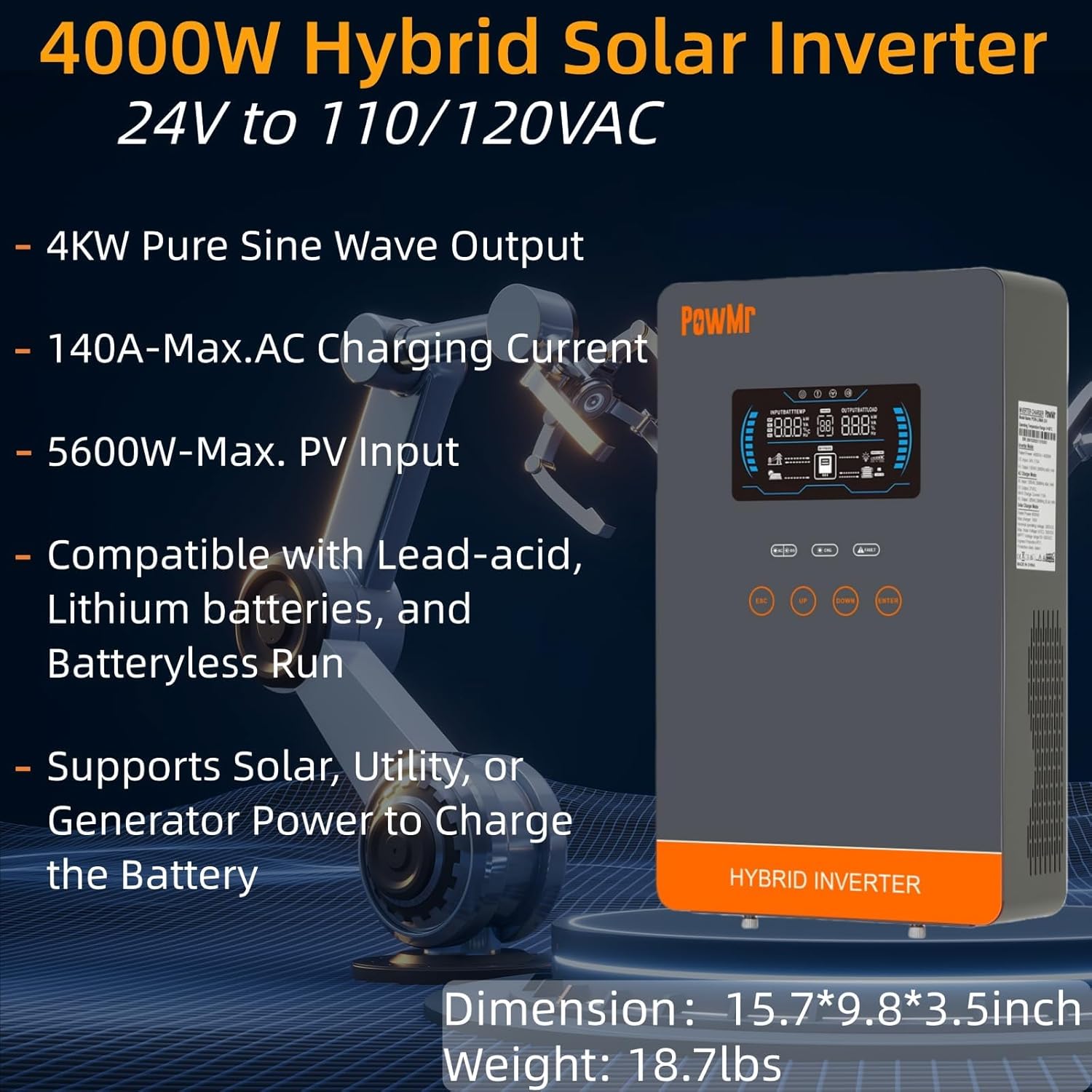
Image: The PowMr 4000W Hybrid Solar Inverter, highlighting its 4KW pure sine wave output, 140A max AC charging current, 5600W max PV input, compatibility with various batteries, and support for solar, utility, or generator power to charge the battery. Dimensions are 15.7"L x 9.8"W x 3.5"H and weight is 18.7lbs.
2. ဘေးကင်းရေး ညွှန်ကြားချက်များ
လျှပ်စစ်ရှော့ခ်၊ မီးလောင်မှု သို့မဟုတ် ဒဏ်ရာရရှိမှုအန္တရာယ်ကို လျှော့ချရန်အတွက် အောက်ပါဘေးကင်းရေးသတိပေးချက်များကို အမြဲလိုက်နာပါ-
- တပ်ဆင်ခြင်းအား အရည်အချင်းပြည့်မီသော ဝန်ထမ်းများမှ လုပ်ဆောင်ရပါမည်။
- Ensure all wiring is correctly sized and properly insulated.
- အင်ဗာတာ မဖြုတ်ပါနှင့်။ အထဲမှာ သုံးစွဲသူအတွက် ဝန်ဆောင်မှုပေးနိုင်တဲ့ အစိတ်အပိုင်းတွေ မရှိပါဘူး။
- အင်ဗာတာအား မီးလောင်လွယ်သောပစ္စည်းများ၊ အစိုဓာတ်နှင့် နေရောင်ခြည် တိုက်ရိုက်ထိတွေ့ခြင်းမှ ဝေးဝေးထားပါ။
- အပူလွန်ကဲခြင်းမှ ကာကွယ်ရန် အင်ဗာတာ ပတ်လည်တွင် လုံလောက်သော လေဝင်လေထွက် ရှိပါစေ။
- ပြုပြင်ထိန်းသိမ်းမှု သို့မဟုတ် ဝိုင်ယာကြိုးများကို မလုပ်ဆောင်မီ ပါဝါရင်းမြစ်များ (PV၊ ဘက်ထရီ၊ AC ထည့်သွင်းမှု) အားလုံးကို အမြဲတမ်း ဖြုတ်ပါ။
- တပ်ဆင်ခြင်းနှင့် ပြုပြင်ထိန်းသိမ်းစဉ်အတွင်း သင့်လျော်သော တစ်ကိုယ်ရေ အကာအကွယ်ပစ္စည်း (PPE) ကို ဝတ်ဆင်ပါ။
3. ကုန်ပစ္စည်းကျော်view
3.1. အင်္ဂါရပ်များ
- Pure Sine Wave အထွက်- Provides stable and clean power suitable for sensitive electronics.
- ပေါင်းစပ် MPPT အားသွင်းထိန်းချုပ်ကိရိယာ: 140A MPPT for efficient solar charging.
- ကျယ်ပြန့်သော ဘက်ထရီ တွဲဖက်အသုံးပြုနိုင်မှု- Supports AGM, Gel, Lead-acid, Lithium-ion, and LiFePO4 batteries.
- Batteryless Mode: Can power loads directly from PV/AC grid without a connected battery.
- အားသွင်းမုဒ်များစွာ- Solar Only, Mains Only, Mains & Solar Hybrid.
- Load Output မုဒ်များစွာ- Utility Priority, Solar Priority, Solar and SBU Priority.
- အဆင့်မြင့်ကာကွယ်ရေး- ဝါယာရှော့ဖြစ်ပြီး voltage, အောက်တွင် voltage, overload, reverse polarity, over-temperature, and backfill protection.
- အသုံးပြုရလွယ်ကူသော အင်တာဖေ့စ်- 6.25-inch LCD screen with touch controls for real-time data display.
- ဆက်သွယ်ရေး ဆိပ်ကမ်းများ- RS485 and RS232 for monitoring and control.
3.2. အစိတ်အပိုင်း သတ်မှတ်ခြင်း

Image: A detailed diagram of the PowMr Hybrid Solar Inverter, showing its front panel and connection ports. Key components labeled include: 1. LCD display, 2. Status indicator, 3. Charging indicator, 4. Fault indicator, 5. Function touch buttons, 6. On/off switch, 7. AC input, 8. AC output, 9. PV input, 10. Battery input, 11. RS485/RS232 communication port.
3.3. ကာကွယ်မှုအင်္ဂါရပ်များ

Image: An illustration detailing the comprehensive protection features of the inverter, including Short Circuit Protection, Over-Load Protection, Over Current Protection, Backfill Protection, Over Voltage Protection, Over-Temperature Protection, Under Voltage Protection, and Over Charge Protection.
4. အထုပ်အကြောင်းအရာများ
ဖြည်ပြီးသည်နှင့် ပစ္စည်းအားလုံး ရှိနေပြီး ပျက်စီးမှုမရှိကြောင်း အတည်ပြုပါ-
- PowMr 4000W Hybrid Solar Inverter
- ညွှန်ကြားချက်လက်စွဲ (ဤစာတမ်း)
- Communication Cables (if applicable, check packaging)
- Mounting Hardware (if applicable, check packaging)
5. တပ်ဆင်ခြင်းနှင့် စနစ်ထည့်သွင်းခြင်း။
5.1. Inverter တပ်ဆင်ခြင်း။
Select a suitable location for mounting the inverter. It should be:
- အိမ်တွင်း၊ နေရောင်တိုက်ရိုက်၊ မိုးရွာခြင်းနှင့် ဖုန်မှုန့်များမှ ကာကွယ်ပေးသည်။
- အပူစွန့်ထုတ်နိုင်စေရန် လေဝင်လေထွက်ကောင်းမွန်စွာ ပြုလုပ်ထားပါသည်။
- Close to the battery bank to minimize cable length and voltage ကျဆင်းသည်။
- On a solid, non-flammable surface.
5.2. ဝါယာကြိုးပုံကြမ်း
Follow the wiring diagram carefully. Incorrect wiring can cause damage to the inverter, batteries, or connected loads, and may pose a safety hazard.

Image: A comprehensive wiring diagram illustrating connections for PV input, Mains/Generator input, AC output, and Battery input. It specifies voltage ranges, current ratings, and recommended wire gauges for each connection point.
5.3. ဘက်ထရီ ချိတ်ဆက်မှု
The inverter is compatible with various 24V battery types. Ensure your battery bank matches the inverter's voltage လိုအပ်ချက်များ။

Image: An illustration showing the inverter's compatibility with various battery types including AGM, GEL, FLD (Flooded), LI (Lithium-ion), SLD (Sealed Lead-Acid), and USER-defined settings. It also indicates a maximum battery charging current of 140A (utility charging + solar charging).
- Connect the battery cables to the inverter's battery terminals, ensuring correct polarity (positive to positive, negative to negative).
- ချိတ်ဆက်မှုအားလုံးကို လုံခြုံစွာ တင်းကျပ်ပါ။
5.4. PV Array Connection
- Connect the solar panel array to the PV input terminals, observing correct polarity.
- Ensure the PV array's open circuit voltage and power are within the inverter's specifications.
၃.၅။ AC အဝင်/အထွက် ချိတ်ဆက်မှု
- Connect the AC utility grid or generator to the AC input terminals.
- သင့် AC ဝန်များကို AC output terminal များနှင့် ချိတ်ဆက်ပါ။
- Ensure all AC connections are properly grounded.
6. လုပ်ငန်းဆောင်ရွက်မှုညွှန်ကြားချက်များ
၅
- ပါဝါဖွင့်ရန်- Ensure all connections are secure. First, connect the battery, then the PV array, and finally the AC input. Press the On/Off switch.
- ပါဝါပိတ်ရန်- Disconnect the AC input, then the PV array, and finally the battery. Press the On/Off switch.
၆.၁။ LCD မျက်နှာပြင်နှင့် ထိန်းချုပ်မှုများ
The LCD screen displays real-time system data. Use the touch buttons to navigate menus and adjust settings.
6.3. Setting Charging and Output Modes
အင်ဗာတာသည် စွမ်းအင်စီမံခန့်ခွဲမှု လိုအပ်ချက်အမျိုးမျိုးနှင့် ကိုက်ညီစေရန် ပြောင်းလွယ်ပြင်လွယ်ရှိသော အားသွင်းခြင်းနှင့် အထွက်မုဒ်များကို ပေးဆောင်သည်။

Image: An illustration detailing the three charging modes (1. Only Solar, 2. Only Utility, 3. Solar+Utility) and three output modes (1. Utility First, 2. Solar First (default), 3. SBU priority). Steps to set programs are also provided: 1. Long press and hold ENTER button for 3s, 2. Press UP and DOWN to select setting programs, 3. Press ENTER to confirm or ESC to exit.
6.3.1. အားသွင်းမုဒ်များ
- နေရောင်ခြည် သီးသန့်- ဘက်ထရီများကို ဆိုလာပြားများဖြင့်သာ အားသွင်းပါသည်။
- Mains များသာ- Charges batteries exclusively from the AC utility grid or generator.
- Mains & Solar Hybrid: Prioritizes solar charging, supplementing with AC utility/generator if solar power is insufficient.
6.3.2. Load Output Modes
- အသုံးအဆောင် ဦးစားပေးမှု- Loads are primarily powered by the AC utility grid. Inverter switches to battery/solar if utility fails.
- နေရောင်ခြည် ဦးစားပေး- Loads are primarily powered by solar and battery. Inverter switches to utility if solar/battery power is insufficient.
- SBU Priority (Solar-Battery-Utility): Loads are primarily powered by solar, then battery, and finally by utility as a last resort.
7. ပြုပြင်ထိန်းသိမ်းမှု
ပုံမှန်ပြုပြင်ထိန်းသိမ်းမှုသည် သင့်အင်ဗာတာ၏ အကောင်းဆုံးစွမ်းဆောင်ရည်နှင့် တာရှည်ခံမှုကို သေချာစေသည်။
- သန့်ရှင်းရေး- Periodically clean the inverter's exterior with a dry cloth. Do not use liquid cleaners.
- လေဝင်လေထွက်- Ensure cooling fan vents are clear of dust and obstructions. The triple cooling fan design helps dissipate heat efficiently.
- ချိတ်ဆက်မှုများ- တင်းကျပ်မှု နှင့် သံချေးတက်ခြင်း လက္ခဏာများ အတွက် လျှပ်စစ် ချိတ်ဆက်မှု အားလုံးကို နှစ်စဉ် စစ်ဆေးပါ။
- ပတ်ဝန်းကျင်- Maintain a clean, dry, and well-ventilated environment around the inverter. The dust-proof design helps prevent dust ingress.
၃
If you encounter issues, refer to the following common problems and solutions. For persistent issues, contact customer support.
| ပြဿနာ | ဖြစ်နိုင်သော အကြောင်းတရား | ဖြေရှင်းချက် |
|---|---|---|
| အင်ဗာတာ မဖွင့်ပါ။ | No battery connection; Low battery voltage; On/Off switch off | Check battery connections; Charge battery; Turn on switch |
| AC အထွက်မရှိပါ။ | Overload; Short circuit; Inverter fault | Reduce load; Check for short circuits; Restart inverter |
| PV charging not working | PV array disconnected; Insufficient sunlight; PV voltage အရမ်းနိမ့်/မြင့်တယ်။ | Check PV connections; Ensure adequate sunlight; Verify PV array specifications |
| အလွန်အကျွံသတိပေးချက် | Connected loads exceed inverter capacity | Disconnect some loads; Ensure total load is within 4000W |
| မြင့်မားသောအပူချိန်သတိပေးချက် | Poor ventilation; Ambient temperature too high | Clear vents; Improve airflow; Relocate inverter if necessary |
9. သတ်မှတ်ချက်များ
Technical specifications for the PowMr 4000W Hybrid Solar Inverter:
| ကန့်သတ်ချက် | တန်ဖိုး |
|---|---|
| မော်ဒယ်နံပါတ် | POW-LVM4K-24V-FBA2 |
| Rated Output ပါဝါ | 4000W |
| ထည့်သွင်းမှု Voltagအီး (DC) | 24VDC |
| အထွက် Voltagအီး (AC) | 110/120VAC |
| Output Waveform | စင်ကြယ်သော Sine Wave |
| မက်တယ်။ PV Open Circuit Voltage | 350VDC |
| PV Array MPPT Voltage Range | 55-350VDC |
| မက်တယ်။ PV Input Power | 5600W |
| Rated Grid Input Voltage | 110/120VAC |
| Max. Hybrid Charging Current (AC+PV) | 140A |
| ဆက်သွယ်ရေး | RS485၊ RS232 |
| Display အမျိုးအစား | LCD |
| အတိုင်းအတာ (L x W x H) | 15.7"L x 9.8"W x 3.5"H |
| အလေးချိန် | 18.7 lbs (approximate, derived from image) |
10. အာမခံနှင့် ပံ့ပိုးမှု
10.1. အာမခံအချက်အလက်
The PowMr 4000W Hybrid Solar Inverter comes with an 18 လအာမခံ from the date of purchase. This warranty covers defects in materials and workmanship under normal use. It does not cover damage caused by improper installation, misuse, accidents, unauthorized modifications, or natural disasters.
10.2. ဖောက်သည်ပံ့ပိုးမှု
For technical assistance, warranty claims, or any questions regarding your PowMr inverter, please contact PowMr customer support through the retailer's platform or the official PowMr website. Please have your model number (POW-LVM4K-24V-FBA2) and purchase date available when contacting support.