
1. နိဒါန်း
This manual provides comprehensive instructions for the Ivation Replacement Remote Control, model JID0TPT01. This remote is specifically designed to operate various Ivation Large Digital LED Timer Clocks. Please read this manual thoroughly to ensure proper setup and operation of your remote control.
2. ထုတ်ကုန်နှင့် လိုက်ဖက်ညီမှု
This replacement remote control is compatible exclusively with the following Ivation Large Digital LED Timer Clock models. It is not a universal remote and will not function with other devices.
- JID0124TBLU, JID0124TRED, JID0124TWHT
- JID0136TBLU, JID0136TRED, JID0136TWHT
- JID0148TRED, JID0148TBLU, JID0148TWHT
- JID0160TRED, JID0160TBLU, JID0160TWHT
- JID0172TBLU, JID0172TRED, JID0172TWHT
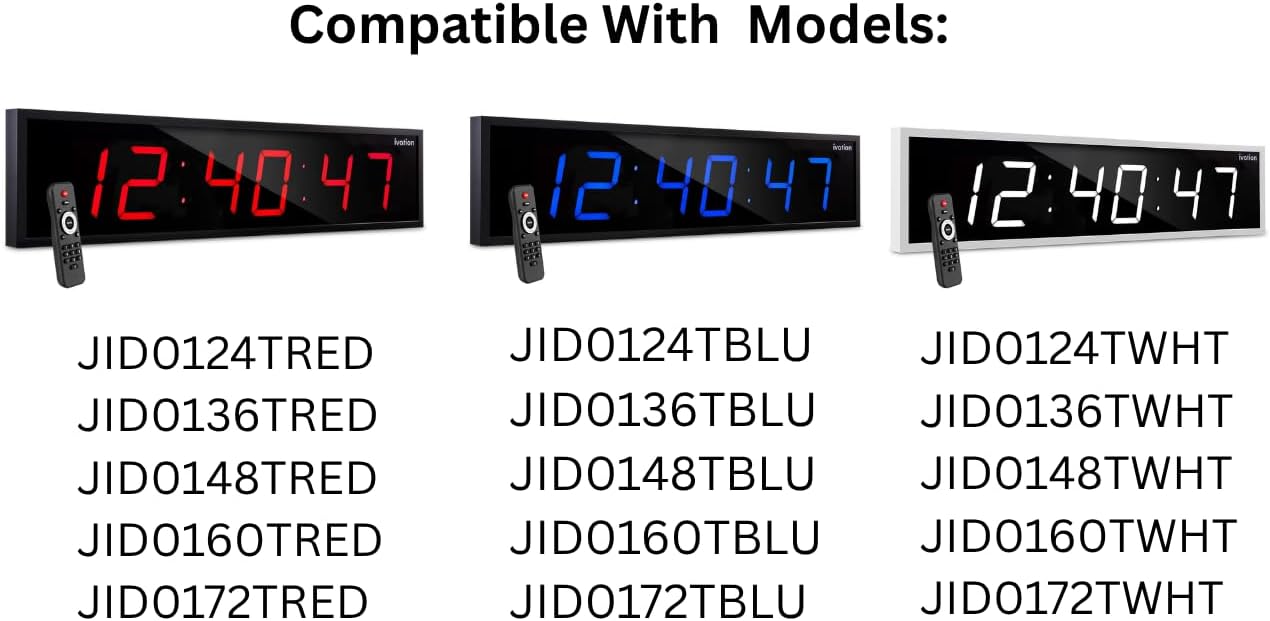
This image illustrates the various Ivation Large Digital LED Timer Clock models that are compatible with this replacement remote control. The clocks are shown in red, blue, and white display colors, each paired with the remote. Below the clocks, a comprehensive list of compatible model numbers is provided for reference.
3. စနစ်ထည့်သွင်းပါ။
3.1 ဘက်ထရီ တပ်ဆင်ခြင်း။
- အဝေးထိန်းခလုတ်၏နောက်ဘက်တွင် ဘက်ထရီအကန့်ကို ရှာပါ။
- ဘက်ထရီခန်းဖုံးကိုဖွင့်ပွတ်ပါ။
- အခန်းအတွင်းတွင် ဖော်ပြထားသည့်အတိုင်း မှန်ကန်သော polarity (+ နှင့် -) ဖြစ်ကြောင်း သေချာစေရန် AAA alkaline ဘက်ထရီ နှစ်လုံး (2) လုံး ထည့်ပါ။
- ဘက်ထရီအဖုံးကို လုံလုံခြုံခြုံပိတ်ပါ။
မှတ်ချက် - Always replace both batteries at the same time. Do not mix old and new batteries or different types of batteries. Remove batteries if the remote will not be used for an extended period.
4. လုပ်ငန်းဆောင်ရွက်မှုညွှန်ကြားချက်များ
The Ivation replacement remote control features a straightforward button layout for easy operation of your compatible Ivation Large Digital LED Timer Clock. Refer to the diagram below for button identification and functions.

This image provides a clear, labeled diagram of the Ivation replacement remote control. Each button is identified with its name and a brief description of its function, such as 'Clock' for showing time, 'Display' for cycling through time, date, and temperature, 'Mute' for toggling alert sounds, 'Brightness' for adjusting display intensity, 'Timer Functions' for stopwatch, countdown, or alarms, 'F/C' for temperature unit toggle, 'AM/PM 12/24' for time format, and the 'Number Pad' for manual settings.
4.1 ခလုတ်လုပ်ဆောင်ချက်များ
- နာရီ- Displays the current time on the clock.
- ပြသမှု- Cycles through different display modes, such as time, date, and temperature.
- အသံတိတ်- Toggles alert sounds (e.g., alarm beeps) on or off.
- တောက်ပမှု- Cycles through 6 different brightness levels for the clock display.
- နှိုးစက်- Accesses alarm settings. Press to set or activate alarms.
- စတင်/ရပ်တန့်- Initiates or pauses stopwatch and countdown timer functions.
- လျှော့တွက်ပါ။ Activates the countdown timer function.
- Set/Enter: Confirms selections or enters settings within menus.
- F/C- အပူချိန်ပြသမှုကို ဖာရင်ဟိုက်နှင့် စင်တီဂရိတ်အကြား ပြောင်းပေးသည်။
- AM/PM 12/24: Cycles the time display between 12-hour (AM/PM) and 24-hour formats.
- နံပါတ် Pad (0-9): Used to manually input numbers for setting time, date, alarms, or timer durations.
၃
သင့်အဝေးထိန်းကိရိယာနှင့်ပတ်သက်သည့် ပြဿနာများကြုံတွေ့ရပါက အောက်ပါအဖြစ်များသော ဖြေရှင်းနည်းများကို ရည်ညွှန်းပါ။
- အဝေးထိန်း တုံ့ပြန်ခြင်းမရှိပါ-
- Ensure the remote has fresh AAA alkaline batteries installed correctly.
- Check for any obstructions between the remote and the clock's infrared receiver.
- Ensure you are within the effective operating range of the remote (typically up to 20 feet).
- ခလုတ်များ အလုပ်မလုပ်ပါ
- Press buttons firmly.
- Clean the remote's surface if there is any debris that might be obstructing button presses.
- ဆက်တိုက်လုပ်ဆောင်မှု-
- ဘက်ထရီအသစ်များဖြင့် အစားထိုးပါ။
- Avoid strong light sources (like direct sunlight) that might interfere with the infrared signal.
If problems persist after attempting these solutions, please contact Ivation customer support.
6. သတ်မှတ်ချက်များ
| မော်ဒယ်အမည် | JID0TPT01 |
| အမှတ်တံဆိပ် | ရေတံခွန် |
| ချိတ်ဆက်မှုနည်းပညာ | အနီအောက်ရောင်ခြည် |
| တွဲဖက်သုံးနိုင်သော စက်များ | Ivation Large Digital LED Timer Clocks (listed in Section 2) |
| ခလုတ်အရေအတွက် | 3 (referring to main function buttons, not including number pad) |
| Controller အမျိုးအစား | ခလုတ်ထိန်းချုပ်မှု |
| ဓာတ်ခဲအမျိုးအစား | Alkaline AAA (x2) |
| အရောင် | အနက်ရောင် |
7. အာမခံနှင့် ပံ့ပိုးမှု
For warranty information and customer support, please refer to the documentation provided with your original Ivation Large Digital LED Timer Clock or visit the official Ivation website. အာမခံတောင်းဆိုမှုများအတွက် သင်၏ဝယ်ယူပြေစာအား သိမ်းဆည်းထားပါ။

