
PowMr ML2440
PowMr 40A MPPT ဆိုလာအားသွင်းထိန်းချုပ်ကိရိယာ အသုံးပြုသူလက်စွဲ
မော်ဒယ်- ML2440
1. နိဒါန်း
This manual provides essential information for the safe and efficient operation of your PowMr 40A MPPT Solar Charge Controller, model ML2440. Please read this manual thoroughly before installation and use to ensure optimal performance and longevity of the product.
2. ဘေးကင်းရေး ညွှန်ကြားချက်များ
- Ensure all wiring is correctly connected and secured to prevent short circuits or damage.
- Always connect the battery to the charge controller first, then the solar panels, and finally the load. Disconnect in the reverse order.
- Do not attempt to repair or modify the controller yourself. Contact qualified personnel for service.
- မီးလောင်လွယ်သောပစ္စည်းများနှင့် နေရောင်ခြည် တိုက်ရိုက်မထိတွေ့သော လေ၀င်လေထွက်ကောင်းသောနေရာတွင် ကွန်ထရိုတာကို တပ်ဆင်ပါ။
- လျှပ်စစ်စနစ်များနှင့် အလုပ်လုပ်သည့်အခါ သင့်လျော်သော ကိုယ်ရေးကိုယ်တာကာကွယ်ရေးပစ္စည်းများ (PPE) ကို ဝတ်ဆင်ပါ။
- စနစ် vol ကိုသေချာပါစေ။tage matches the controller's specifications (12V/24V auto-detection).
3. ကုန်ပစ္စည်းကျော်view
The PowMr 40A MPPT Solar Charge Controller is designed to efficiently manage power from your solar panels to charge various battery types, including Lithium, Sealed, Gel, and Flooded batteries. It features Maximum Power Point Tracking (MPPT) technology for optimized solar energy harvesting, automatic 12V/24V system voltage detection, and a clear LCD display for monitoring system status.
ပုံ 3.1- ရှေ့ view of the PowMr 40A MPPT Solar Charge Controller.
This image shows the main unit of the PowMr 40A MPPT Solar Charge Controller, highlighting its compact design and integrated LCD screen.
The controller supports a maximum solar input voltage of 100V and a maximum input power of 1100W for a 24V system (550W for 12V). It also includes temperature compensation for accurate charging across varying environmental conditions.

ပုံ 3.2- Temperature compensation feature.
This image illustrates the temperature compensation capability of the controller, ensuring optimal battery charging performance in both hot and cold environments.
4. တပ်ဆင်ခြင်းနှင့်ဝါယာကြိုး
Proper installation is crucial for the safe and efficient operation of your solar charge controller. Follow these steps carefully.
4.1 Wiring Diagram

ပုံ 4.1- Wiring diagram for the PowMr MPPT Solar Charge Controller.
This diagram illustrates the correct connection order for the battery, solar panels, DC load, and optional inverter. A temperature sensor is also shown.
4.2 ချိတ်ဆက်မှု အဆင့်များ
- Connect Battery First: Connect the battery to the charge controller's battery terminals. Ensure correct polarity. The controller will auto-detect 12V or 24V system voltage.
- ဆိုလာပြားများကို ချိတ်ဆက်ပါ- Connect the solar panels to the PV input terminals. Ensure correct polarity. The controller will begin charging if sufficient sunlight is available.
- Connect DC Load (Optional): If using a DC load directly from the controller, connect it to the load terminals.
- Connect Inverter (Optional): If using an inverter, connect it to the battery terminals (not directly to the load terminals of the controller).
- အပူချိန်အာရုံခံကိရိယာကို ချိတ်ဆက်ပါ- For accurate temperature compensation, connect the provided temperature sensor to the designated port on the controller and place the sensor near the battery.
Disconnection Order: To disconnect the system, always follow the reverse order: Disconnect load, then solar panels, then battery.
5. လုပ်ငန်းဆောင်ရွက်မှုညွှန်ကြားချက်များ
This section details how to monitor and configure your charge controller using its integrated LCD display and the optional Bluetooth mobile application.
5.1 LCD Display Overview

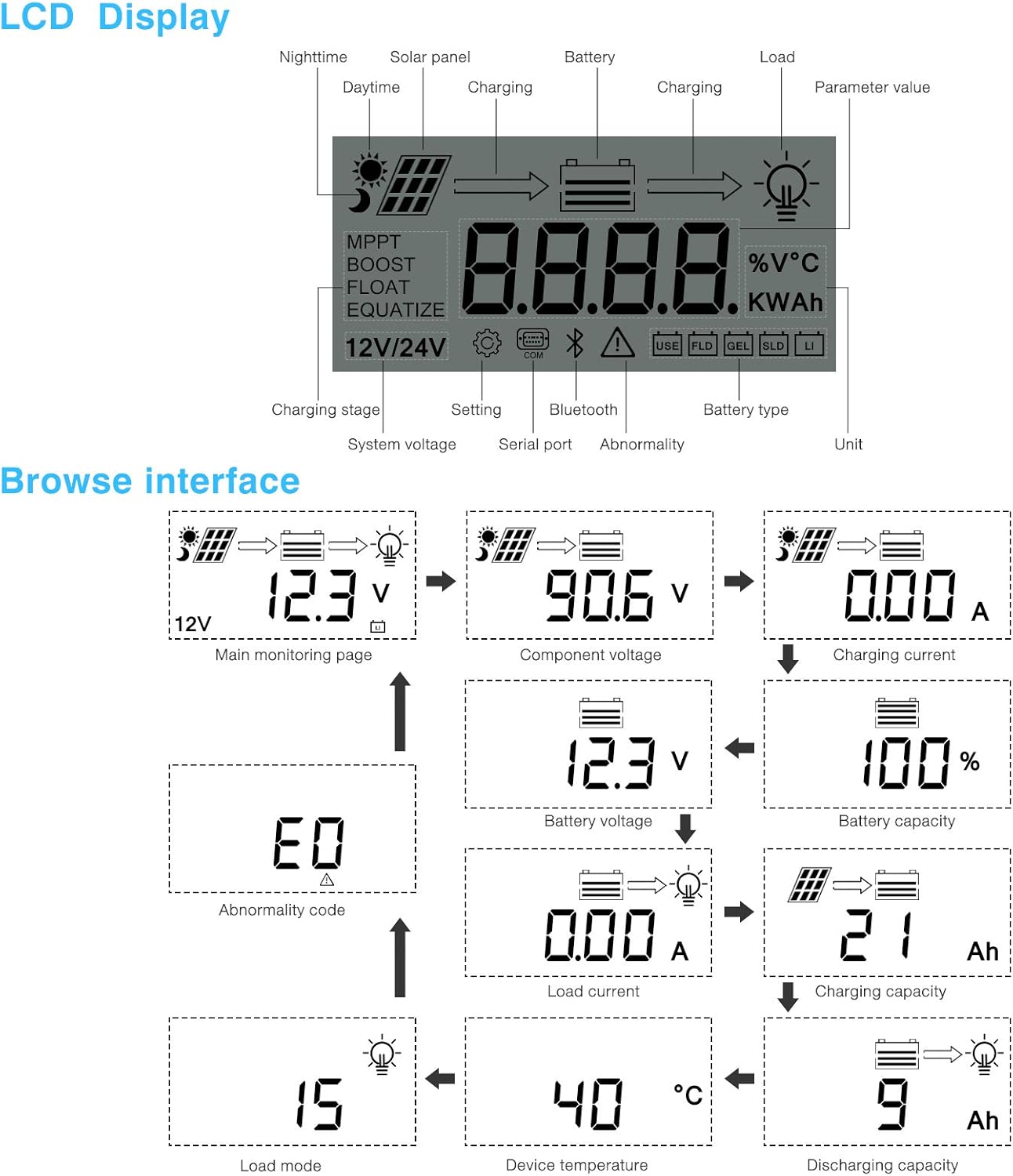
ပုံ 5.1- LCD Display and Browse Interface.
This image shows the various icons and parameters displayed on the LCD screen, along with the navigation flow through different monitoring pages.
The LCD provides real-time information about your solar system. Key indicators include:
- အားသွင်းခြင်း Stage: MPPT, Boost, Float, Equalize.
- စနစ် Voltage: 12V/24V auto-detected.
- ဓာတ်ခဲအမျိုးအစား - Icons for Lithium (Li), Sealed (SLD), Gel (GEL), Flooded (FLD).
- အခြေအနေအညွှန်းကိန်း: Solar panel activity, battery charging, load status, abnormality.
- ကန့်သတ်တန်ဖိုး- vol ကိုပြသသည်။tage, current, capacity, temperature, etc.
Use the buttons below the LCD to navigate through different screens to view parameters such as main monitoring page, component voltage၊ အားသွင်းလက်ရှိ၊ ဘက်ထရီ voltage, battery capacity, load current, charging capacity, device temperature, discharging capacity, abnormality codes, and load mode.
5.2 Bluetooth Mobile Application
The controller supports an optional Bluetooth module (BT-1) for remote monitoring and parameter adjustment via a mobile application (available for Apple iOS and Android devices). The Bluetooth module connects to the RS232 port on the controller.

ပုံ 5.2- Controller with optional Bluetooth module.
This image displays the PowMr MPPT Solar Charge Controller alongside its optional BT-1 Bluetooth communication module and connecting cable.

ပုံ 5.3- BT-1 Bluetooth module.
အသေးစိတ်တစ်ခု view of the BT-1 Bluetooth module, which enables wireless communication with the solar charge controller for remote monitoring and settings adjustments.

ပုံ 5.4- Bluetooth Mobile Interface Display.
This image shows various screens from the mobile application, including real-time monitoring, data records, energy records, and parameter settings.
The mobile application allows you to:
- Monitor real-time system data (voltage, current, power, temperature).
- View historical data and energy records.
- Adjust various charging parameters and battery settings.
- စက်ရုံမှမူလဆက်တင်များကိုပြန်ယူပါ။
6. ပြုပြင်ထိန်းသိမ်းမှု
ပုံမှန်ပြုပြင်ထိန်းသိမ်းမှုသည် သင့်အားသွင်းထိန်းချုပ်ကိရိယာ၏ သက်တမ်းကြာရှည်မှုနှင့် အကောင်းဆုံးစွမ်းဆောင်ရည်ကို သေချာစေသည်။
- သန့်ရှင်းရေး- Periodically clean the controller's exterior with a dry cloth to remove dust and debris. Ensure ventilation openings are clear.
- ချိတ်ဆက်မှုများ- Annually check all wiring connections for tightness and corrosion. Loose connections can cause overheating and poor performance.
- ပတ်ဝန်းကျင်- Ensure the installation environment remains within the specified operating temperature range and is free from excessive moisture or dust.
၃
This section provides guidance for common issues. Refer to the LCD display for abnormality codes.
- ပြကွက်မရှိ/ပါဝါမရှိ-
- Check battery connections and ensure the battery voltage သည် လည်ပတ်မှုအကွာအဝေးအတွင်းဖြစ်သည်။
- Verify that the battery fuse (if installed) is intact.
- အားသွင်းခြင်းမရှိပါ-
- Ensure solar panels are connected correctly and receiving sufficient sunlight.
- ဆိုလာပြား voltage နှင့် လက်ရှိ။
- Verify that the battery is not fully charged or in a protection state.
- Load အလုပ်မလုပ်ပါ
- Check load connections and ensure the load current does not exceed the controller's rating.
- ဘက်ထရီ vol ကိုစစ်ဆေးပါ။tage သည် low vol အထက်တွင်ရှိသည်။tage ချိတ်ဆက်မှုပြတ်တောက်မှု (LVD) ဆက်တင်။
- Check for any abnormality codes on the LCD related to load output.
- Abnormality Codes (e.g., "E0"):
- Refer to the specific abnormality code displayed on the LCD. Consult the full product manual or manufacturer's support for detailed explanations and solutions for each code.
8. သတ်မှတ်ချက်များ
Technical specifications for the PowMr 40A MPPT Solar Charge Controller (Model ML2440).

ပုံ 8.1- Product Specifications Table.
This table provides detailed technical parameters for the ML2420, ML2430, and ML2440 models. The ML2440 column is relevant for this 40A controller.
| ကန့်သတ်ချက် | Value (ML2440) |
|---|---|
| မော်ဒယ် | ML2440 |
| စနစ် voltage | 12V / 24V အော်တို |
| အဘယ်သူမျှမ - ဝန်အရှုံး | 0.7 W မှ 1.2W |
| ဘက်ထရီပမာဏtage | 9 မှ 35V |
| မက်။ နေရောင်ခြည်ထည့်သွင်းမှု voltage | 100V (25°C), 90V (-25°C) |
| မက်။ ပါဝါပွိုင့် voltage အကွာအဝေး | ဘက်ထရီပမာဏtage +2V မှ 75V အထိ |
| လက်ရှိအားသွင်းအဆင့်သတ်မှတ်ထားသည် | 40A |
| အဆင့်သတ်မှတ်ထားသော ဝန်လက်ရှိ | 20A |
| မက်စ်။ capacitive ဝန်စွမ်းရည် | 10000uF |
| မက်စ် photovoltaic စနစ်က input ကိုပါဝါ | 550W/ 12V, 1100W/ 24V |
| ပြောင်းလဲခြင်းထိရောက်မှု | ≤ 98% |
| MPPT ခြေရာခံခြင်းထိရောက်မှု | > 99% |
| အပူချိန်လျော်ကြေးအချက် | -3.0mv/ °C/ 2V (default) |
| လည်ပတ်အပူချိန် | -35°C မှ +45°C |
| ကာကွယ်ရေးဘွဲ့ | IP32 |
| အလေးချိန် | 2 ကီလိုဂရမ် |
| ဆက်သွယ်ရေးနည်းလမ်း | RS232 |
| အမြင့် | ≤ 3000m |
| ထုတ်ကုန်အတိုင်းအတာ | 238*173*72.5 မီလီမီတာ |
9. အာမခံနှင့် ပံ့ပိုးမှု
For warranty information, please refer to the documentation included with your product packaging or visit the official PowMr website. If you encounter any issues not covered in this manual or require further assistance, please contact PowMr customer support.
PowMr Official Webဆိုက်- Visit the PowMr Store on Amazon